 رهجویان | جامع ترین آرشیو کتاب های زبان اصلی
-
Date: 2025
Edition: 5th
Length: 824 pages
Format: PDF
ISBN-13: 9781837029907
Publisher: Packt PublishingKey benefits
Configure, manage, secure, and troubleshoot Windows Server environments from the ground up
Understand and take control of key components including AD, DNS, DHCP, GPO, and PKI
Apply knowledge in real-world labs and walkthroughs that bring each server role to lifeDescription
Written by a 10-time Microsoft MVP with 25 years of IT and technical coaching experience, this practical guide offers real-world expertise in Windows Server management. From building and connecting servers to securing them, and even intentionally breaking them to learn, you’ll find comprehensive, experience-based coverage that takes you deep into professional administration. Fully updated for the 2025 release, this edition prepares you to manage any Windows Server environment, whether deploying the latest version or maintaining Server 2012 in a modern infrastructure. You’ll work with PowerShell, Server Manager, Windows Admin Center, RSAT, and Azure Arc to achieve centralized and efficient administration. While the focus is on Windows Server 2025 LTSC with Desktop Experience, the book also explores Server Core, containerization, and the evolving role of Nano Server. Along the way, you’ll gain hands-on experience with core services, including Active Directory, DNS, DHCP, and Group Policy, and explore advanced topics such as certificate services and PKI, Hyper-V virtualization, Remote Desktop Services, failover clustering, DFS, and Intune integration. By the end of this book, you’ll have the skills to manage and modernize complex server infrastructures with confidence.
Who is this book for?
This book is for IT professionals who want to step into a full systems administrator role or modernize their server management skills. Whether you’re managing legacy Windows Server deployments or preparing for 2025 migrations, you’ll find practical, hands-on content tailored for sysadmins, IT operations teams, and infrastructure engineers. Newcomers to Windows Server will build the foundation they need, while experienced admins will discover what’s new and what’s next in Server 2025.What you will learn
Create an entire lab of new servers and configure multiple roles
Manage servers using Server Manager, PowerShell, and Windows Admin Center
Close knowledge gaps in core infrastructure technologies such as Active Directory, DNS, DHCP, and Group Policy
Virtualize your datacenter with Hyper-V
Create redundancy through Failover Clustering services
Deploy Remote Desktop Services
Design and implement Distributed File System with Replication (DFSR) and Storage Replica
Don the DevOps cap as you explore containers and Nano ServerWhat do you get with eBook?
Product feature icon Instant access to your Digital eBook purchase
Product feature icon Download this book in EPUB and PDF formats
Product feature icon Access this title in our online reader with advanced features
Product feature icon DRM FREE – Read whenever, wherever and however you wantTable of Contents
19 Chapters
Getting Started with Windows Server 2025 Chevron down icon
Getting Started with Windows Server 2025
The purpose of Windows Server
Your head in the clouds
Windows Server versions and licensing
Overview of new and updated features
Features deprecated in Server 2025
Navigating the interface
Windows Settings
Task Manager
Task View
Summary
Questions
Installation and Management Chevron down icon
Installation and Management
Technical requirements
Installing Windows Server 2025
Installing roles and features
Centralized management and monitoring
Windows Admin Center
Azure Arc
Quick server rollouts with Sysprep
In-place upgrading to Windows Server 2025
Summary
Questions
Active Directory Chevron down icon
Active Directory
What is a domain controller?
Creating your first domain
Multiple domain controllers for redundancy
Active Directory Users and Computers
Active Directory Domains and Trusts
Active Directory Sites and Services
Active Directory Administrative Center
Read-only domain controllers
FSMO roles
Demoting an old domain controller
Intro to Group Policy
Microsoft Entra ID
Summary
Questions
DNS and DHCP Chevron down icon
DNS and DHCP
The purpose of DNS
Types of DNS records
Split-brain DNS
Types of DNS zones
DNS-over-HTTPS
IP addressing with DHCP
Creating a DHCP scope
DHCP reservations
DHCP failover
IPAM
Summary
Questions
Join us on Discord
Group Policy Chevron down icon
Group Policy
Group Policy Objects
Building a GPO
Scoping a GPO
Computer settings and user settings
Policy versus preference
Default Domain Policy
Administrative Templates
The Central Store
Summary
Questions
File Management Chevron down icon
File Management
Data is a company’s lifeblood
File shares
Automated drive mappings
File permissions
Distributed File System (DFS)
File Transfer Protocol (FTP)
SMB over QUIC
Summary
Questions
Join us on Discord
Certificates Chevron down icon
Certificates
Common certificate types
Planning your PKI
Creating a certificate template
Issuing certificates
Obtaining a public authority SSL certificate
Exporting and importing certificates
OpenSSL for Linux webservers
Summary
Questions
Networking with Windows Server 2025 Chevron down icon
Networking with Windows Server 2025
IPv4 “need-to-know” information
Introduction to IPv6
Your networking toolbox
The Windows routing table
NIC teaming
Software-defined networking
Summary
Questions
Join us on Discord
Remote Access Chevron down icon
Remote Access
Regular ol’ VPN
Always On VPN
DirectAccess
Remote Access Management Console
DA, VPN, or AOVPN? Which is best?
Web Application Proxy
Summary
Questions
Hardening and Security Chevron down icon
Hardening and Security
Microsoft Defender Antivirus
Windows Defender Firewall: no laughing matter
Encryption technologies
Microsoft Entra Password Protection
Fine-grained password policy
Windows LAPS
Advanced Threat Analytics: end of support
General security best practices
Summary
Questions
Join us on Discord
Server Core Chevron down icon
Server Core
Why use Server Core?
Interfacing with Server Core
Using Windows Admin Center to manage Server Core
The SConfig utility
Roles available in Server Core
Building a Server Core domain controller
What happened to Nano Server?
Can we run Server Core in Azure?
Summary
Questions
PowerShell Chevron down icon
PowerShell
Why move to PowerShell?
Working within PowerShell
Importing a module
Using a pipeline
PowerShell Integrated Scripting Environment
Remotely managing a server
Desired State Configuration
WinGet application management
PowerShell for M365
Windows Terminal in Server 2022
Summary
Questions
Redundancy in Windows Server 2025 Chevron down icon
Redundancy in Windows Server 2025
Network Load Balancing
Configuring a load-balanced website
Failover clustering
Clustering tiers
Setting up a failover cluster
Clustering improvements in Windows Server
Storage Replica
Storage Spaces Direct
Summary
Questions
Containers Chevron down icon
Containers
Understanding application containers
Container base images
Windows Server containers versus Hyper-V containers
Docker and Kubernetes
Working with containers
Where is Azure in all this?
Summary
Questions
Join us on Discord
Hyper-V Chevron down icon
Hyper-V
Designing and implementing Hyper-V server
What’s new in 2025?
Virtual switches
Implementing a virtual server
Managing a virtual server
Shielded VMs
Resilient Filesystem (ReFS) deduplication
Integrating Hyper-V with Linux
Hyper-V Server…2019?
Summary
Questions
Remote Desktop Services Chevron down icon
Remote Desktop Services
Wherefore art thou, role?
Components of an RDS environment
Publishing RDS sessions
RDS licensing
RDS user profiles
RemoteApp
RDS maintenance considerations
Azure Virtual Desktop
Summary
Questions
Join us on Discord
Troubleshooting Chevron down icon
Troubleshooting
Backup and restore
Task Manager
Resource Monitor
Performance Monitor
Sysinternals tools
DTrace
Windows Firewall with Advanced Security
System Insights
Remote toolsets
Event Logs
MMC and MSC shortcuts
Feedback Hub
Summary
Questions
Other Books You May Enjoy Chevron down icon
Other Books You May Enjoy
Index
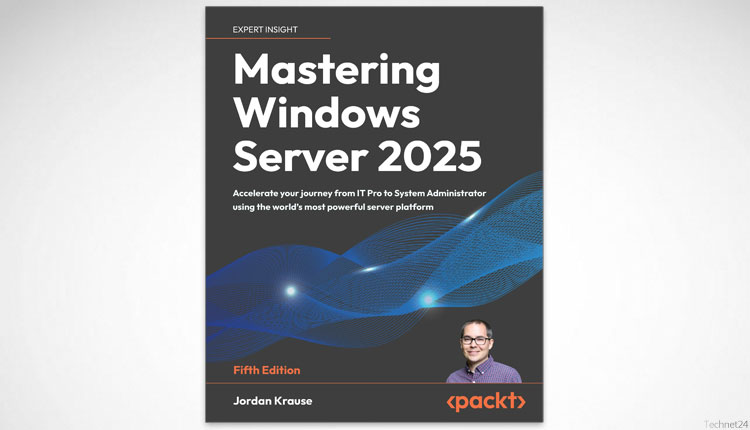
دانلود کتاب Mastering Windows Server 2025
68,000تومان

محصولات مرتبط





نقد و بررسی وجود ندارد.